CBC-PROC-196 Version 1 last review date: Jul, 2019
Work Requests represent a request for CBC to engage a technician to perform work. Work Requests are often raised in response to a fault on a piece of equipment / asset maintained by CBC. Only when a Work Request is approved by the Client and converted to a Work Order by CBC will a technician be despatched to address the request.
Users who can approve a Work Request are governed by Contract Settings, and your role. If you are not assigned to a Contract that allows you to approve a Work Request, you may find that certain functions will not be available to you.
1. Finding a Work Request
1.1. Via the Work Request List
- On the Navigation Panel, click ‘Work Requests’, then ‘List’
- Use the filters on Work Request List to locate a Work Request you wish to approve.
1.2. Via the Work Request Workflow Panel
- On the Work Request Workflow Panel, click the number corresponding with ‘Awaiting Client Approval’
- This will bring up a filtered list of Work Requests that you can approve.
2. Approving a Work Request
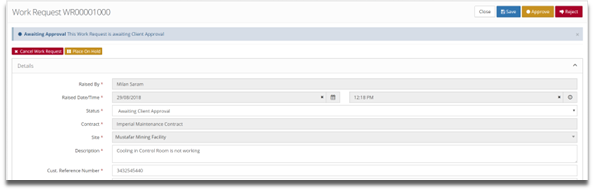
2.1. Open the Work Request
2.2. Review the details provided
- Changes can be made if required.
2.3. Click the ‘Approve’ button to bring up the Approval form.
2.4. Complete the Approval Form and click ‘Confirm Approval’
3. When A Work Request is approved
- The status of the Work Request will be updated automatically.
- An entry will appear in the Approval panel on the Work Request, showing who approved it and at what date and time.
- A notification will be sent to CBC to advise them it is ready to be converted to a Work Order.