CMMS User GuideFeedbackFeedback (opens in a new tab)logoutlogout
  • Introduction
    • Templates
    • Adding a Site and Asset
    • Asset Capture
    • Navigation
    • Create Account and Sign In
    • Tag Users In Comments
    • Glossary of Terms
    • Create and Use Catalogue Items
    • Create New Client
    • Setup procedure
    • Template Contracts
    • Required Document Settings
    • Lodge
    • Approve
    • Dispute
    • Raise a Debtor Invoice
    • Add New Provider
    • New Provider Checklist
    • Create Purchase Order
    • Create and Manage
    • Projects Procedure
    • Managing Schedules
    • Raising Scheduled Work Orders
    • Site On/Off
    • Logging Issues
    • Troubleshooting
    • Contact Support
    • Frequently Asked Questions
    • Update Safari Settings
    • Feature Requests
    • Propose New User
    • Add New User
    • Check and Update Distribution lists
    • Submit a Qualification
    • The No-Role Landing Page
    • Blocking a User
    • Managing Financial Delegation Limits
    • WorkFlow Panel
    • Create Work Order
    • Attach Paperwork
    • Auto-Archive
    • Complete a Service Report
    • Utilising Automatic Cost Lines
    • Create
    • Approve
    • Data Import Spreadsheet
    • Updates
    • ServiceChannel (TK Maxx)
    • MEX (Endevour)
    • Managing Scheduled Reports
    • Paperwork Processing Tool

On This Page

  • CBC-PROC-029 Version 1 last review date: Nov, 2021
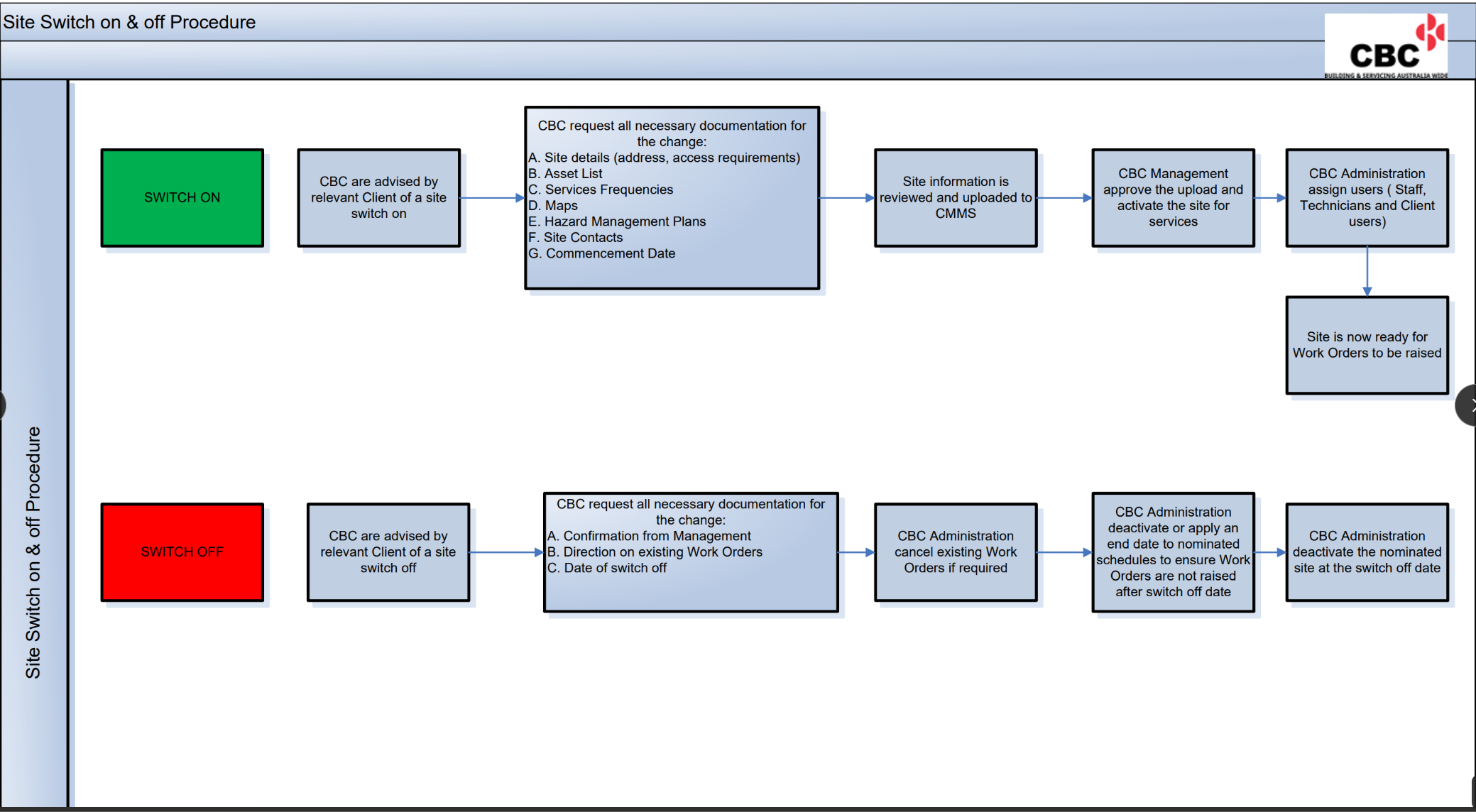
  • Site On/Off
Sites
Site On/Off
CBC-PROC-029 Version 1 last review date: Nov, 2021

Site On/Off

CBCPROC029001
Raising Scheduled Work OrdersLogging Issues
CMMS User Documentation