CBC-PROC-063 Version 4 last review date: May, 2020
Distribution lists are managed via each User’s Contract and Site Assignment, and Notification Settings. These settings are found on the User Profile view. Note that the ability to adjust Contract and Site assignments is Role based, meaning not all users will have this ability.
1. Find the User you wish to adjust
1.1. Adjusting your own Profile
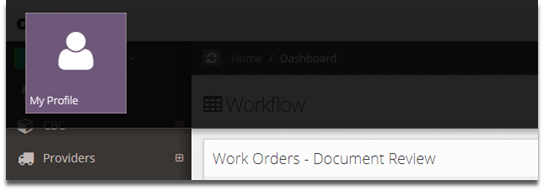
- Click your name in the top right corner, then click ‘My Profile’
1.2. Navigate to a User via the User List
- Click the ‘CBC Group’ menu option from the Navigation Panel, then click the ‘User List’ menu option to view all Users.
- Use filters to find the User you wish to review. The ‘First Name’, ‘Last Name’ and ‘Parent’ filters are the most useful in this case.
- Click on the User profile picture or click the button to view the User Profile.
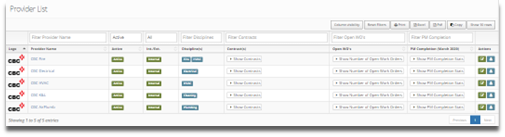
1.3. Adjusting a Provider User Profile via Provider List.
- Navigate to the Provider List, and locate the Provider to whom the User you wish to adjust belongs.
- Click the ‘Contact List’ button to bring up the Contact List for that Provider
- Locate the User you wish to adjust and click the name or the ‘Edit’ button to open that User’s Profile.
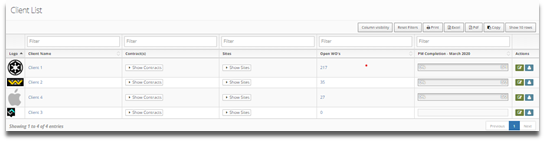
1.4. Adjusting a Client User Profile
- Navigate to the Client List, and locate the Client to whom the User you wish to adjust belongs.
- Click the ‘Contact List’ button to bring up the Contact List for that Provider
- Locate the User you wish to adjust and click the name or the ‘Edit’ button to open that User’s Profile.
2. Viewing and Adjusting the Settings
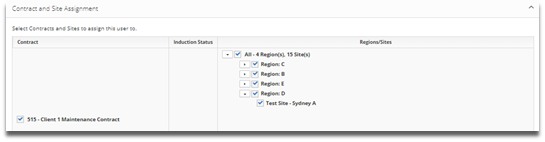
2.1. Open the ‘Contract & Site Assignment’ panel and adjust the settings as necessary
- By expanding the list (via the arrow button), a User can be assigned to a subset of sites within a contract.
2.2. Open the Notification Settings Panel and Adjust the settings as necessary
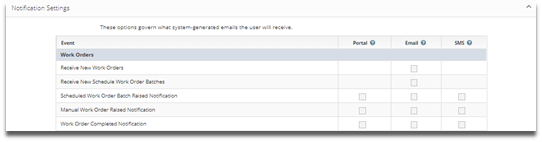
2.3. Click the ‘Save’ button in the lower right corner to save any changes that have been made.
3. Notification Type List
Notifications are sent based on the user’s Contract and Contract and Site assignment. The user will only receive Notifications for the Contracts and Sites to which they are assigned.
| NOTIFICATION TYPE | DESCRIPTION |
|---|---|
| Receive New Work Orders | Notify user when New Work Order is created. |
| Receive New Schedule Work Order Batches | Notify user when New Schedule Work Order Batch is created. |
| Scheduled Work Order Batch Raised Notification | Notify user when Schedule Work Order Batch is raised. |
| Manual Work Order Raised Notification | Notify user when manual Work Order is raised. |
| Work Order Approaching Commencement Deadline Notification | Notify user when Work Order is approaching it’s commencement deadline. |
| Work Order Approaching Completion Deadline Notification | Notify user when Work Order is approaching it’s completion deadline. |
| Work Order Completed Notification | Notify user when Work Order is completed. |
| Work Order Log Off Reminder Notification | Notify user reminding them to Log off a Work Order. |
| User Qualification Close To Expiry/Expired Notification | Notify user when their Qualifications are close to expiring. |
| Provider Qualification Close to Expiry/Expired Notification | Notify user when Provider’s Qualifications are close to expiring. |
| Receive Debtor Invoice | Notify user when a new Debtor Invoice is received. |
| Receive Creditor Invoice | Notify user when a new Creditor Invoice is received. |
| Creditor Invoice Submitted Notification | Notify user when a new Creditor Invoice is submitted. |
| Debtor Invoice Submitted Notification | Notify user when a new Debtor Invoice is submitted. |
| New User sign up Notification | Notify user when a New User signs up. |
| New Proposed User Notification | Notify user when a Proposed User is created. |
| New Work Request Submitted (Client Approval Required) Notification | Notify user when a new Work Request is submitted. |
| Work Request Approved for Action Notification | Notify user when a Work Request is Approved for Action. |
| Work Request Rejected Notification | Notify user when a Work Request is Rejected. |
| Audit Complete (Work Order) | Notify user when a Work Order related Audit is completed. |
| Audit Complete (Site) | Notify user when a Site related Audit is completed. |
| Audit Complete (Provider) | Notify user when a Provider type Audit is completed by another user, only where the Provider is assigned to a Contract to which the user is assigned. |
| Receive Quote | The user will receive submitted quotes. |
| Receive Quote Submitted Notification | Notify user when a Quote is submitted. |
| New Quote Request Submitted | Not in use. |
| Quote Approval Request (Internal) | Notify user when a Quote is referred to a user during the internal approval process. |
| Quote Approved/Reject (Internal) Notification | Notify user when a Quote is approved or rejected internally. |
| Quote Approved/Declined Notification | Notify user when a Quote is approved or declined by the Client or on behalf of the Client. |
| Quote Expired | Notify user when a Quote becomes expired. |
Should a new User be required, please see ‘CBC-PROC-141 Propose New User’.
If a Contract does not appear in the list of available contracts for the User, it may be that the Parent of the User is not assigned to the Contract. Provider Contract assignment is managed by the Contract Manager or Contract Administrator.