CBC-PROC-251 Version 1 last review date: Jun, 2019
When adding comments to various entities such as Work Orders and Invoices, you are able to tag Tenant, Provider and Client users in your comment, which will generate a notification to each tagged user via Email, App and Portal.
1.0 Tagging users in Comments
From an entity with comments (such as Work Order View, Debtor Invoice View, Creditor Invoice/PO View) navigate to the Action panel.
Select the desired Comment Type from the Action dropdown list.
Type the ‘@’ character in the comment field to trigger the appearance of the user list.
Select the desired user by scrolling the drop-down list or type the users name to filter the list.
Repeat the steps from step 1.3 to tag multiple users if required.
Continue typing the text of your message. Text can be added before, after or between tags.
Click the ‘Add’ button to submit your comment.
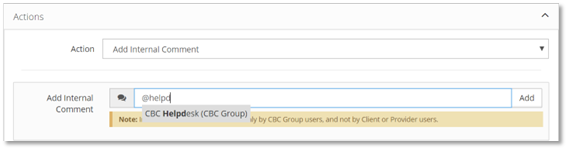
2.0 Remove a tag (before the comment is submitted)
2.1 Simply use the backspace key to remove the users name including the @ character to remove that particular tag.
Once a comment is created, the tag cannot be removed.
3.0 Notifications
When a comment is added that includes a tagged user, a notification is generated for each tagged user. These notifications will be sent via email, portal and app.
If the tagged user does not have a valid email address in CMMS, the notification will be delivered only to the CBC CMMS Portal, and not via email.
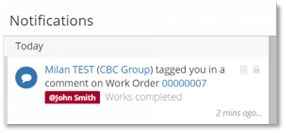
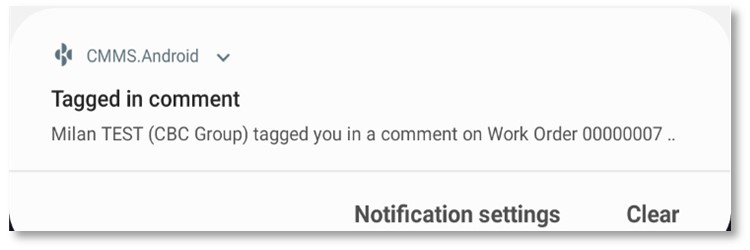
4.0 Notes on available comment types and Users
The Comment types available to you are determined by your Parent.
The Users available to be tagged in a comment are governed by each users assignments. For example, if a user will not be able to see a particular Work Order due to their assignments, they will not be able to be selected from the list of available users to tag.
| COMMENT TYPE | VISIBLE TO |
|---|---|
| Internal Comments | Internal comments are viewable only by CBC Group users, and not by Client or Provider users. |
| Client Comments | Client comments are viewable by Client and CBC Group users, and not by Provider users. |
| Provider Comments | Provider comments are viewable by the assigned Provider and CBC Group users, and not by Client users. |
| YOUR PARENT TYPE | USER TYPES YOU CAN TAG IN A COMMENT |
|---|---|
| Tenant | Tenant Users, Provider Users, Client Users |
| Client | Tenant Users, Client Users |
| Provider | Tenant Users, Provider Users |