Support
Update Safari Settings
CBC-PROC-257 Version 1 last review date: Jul, 2019
ℹ️

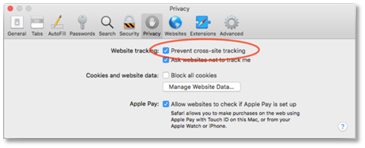
To access CMMS from the Apple Safari browser, it is necessary to switch off the ‘Prevent Cross-Site Tracking’ feature. This applies to the Safari browser running on both mobile device (iPhone and iPad) and desktop (Mac).
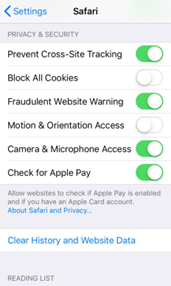
1.0 Update Safari settings on iOS (iPhone & iPad)

Navigate to ‘Settings’.

Navigate to ‘Safari’.

Turn off ‘Prevent Cross-Site Tracking’.

CBCPROC257001

2.0 Update Safari settings on your Mac

From the Safari browser, go to ‘Preference’.

Click the Privacy tab.

Uncheck ‘Prevent Cross-Site Tracking’.

CBCPROC257002